A Rigorous, Practical Journey for Beginners
You don't need prior programming experience or a computer science degree. We teach you foundational web mechanics, then guide you to direct AI coding agents to build a functional, real-world application.
Aspiring software professionals, career switchers, entrepreneurs, and technical assistants who want to build real web applications from scratch without getting lost in overwhelming syntax.
A complete, responsive small-business service booking web application with service selection, client-side validation, interactive summary modals, API integration, and production hosting.
A working laptop or desktop (Windows, macOS, or Linux) with at least 8GB RAM, a modern browser (Chrome, Firefox, Edge), and steady internet access for running the cloud agents and LMS videos.
Learners use 100% zero-cost free tiers: Google Antigravity & AI Studio, OpenAI Codex, GitHub, and the Supabase Free Plan ($0/mo, no card required).
You do NOT need any paid tool subscriptions or cloud hosting plans to complete this course. All exercises, prompt labs, and capstone requirements are engineered around zero-cost tiers: Google Antigravity / AI Studio (free standard Google account), OpenAI Codex (free tier at platform.openai.com), GitHub (free account at github.com/join), and Supabase (Free Tier at supabase.com/pricing with no credit card required). We also provide zero-cloud local mock services so you never incur unexpected charges.
What You Will Be Able to Do by the End of This Course
Every module reinforces practical competence. You do not just watch; you direct, write specifications, inspect code, debug errors, and deploy working software.
Articulate the clear differences between static sites and web apps, client-server HTTP request cycles, DNS routing, and hosting architecture.
Break down vague product ideas into structured user stories, wireframe schematics, feature lists, and realistic MVP project boundaries.
Give Codex and Antigravity scoped, high-context instructions using industry-standard prompt formats that prevent agent drift.
Write accessible, SEO-sound markup utilizing semantic elements, heading hierarchies, forms, and proper metadata.
Master the box model, Flexbox, CSS Grid, media queries, and design token scales across mobile and desktop viewports.
Command variables, conditions, functions, array methods, DOM event listeners, and dynamic client-side state manipulation.
Construct accessible forms with live field validation, custom error messaging, ARIA attributes, and friendly empty states.
Organise project repositories, make atomic commits, branch safely, resolve conflicts, and publish code to GitHub.
Fetch asynchronous JSON data, handle HTTP status codes, handle pending/error states, and parse server responses.
Understand relational tables, foreign keys, row-level security, auth sessions, and safe access boundaries without exposing credentials.
Execute automated WCAG 2.1 AA audits, test keyboard focus, prevent OWASP Top 10 vulnerabilities, and deploy live to production.
The 12-Module Curriculum (~60 Guided Hours)
Each module represents approximately 5 guided learning hours combining open video lectures, interactive concepts, AI prompt labs, and hands-on deliverables.
The Capstone Project: Small-Business Service Booking Application
Throughout the 12 modules, you build one coherent, production-ready web application using fictional business data (e.g., local tech support, plumbing, or salon services).
Structured semantic cards displaying service names, estimated duration, base pricing, and dynamic selection states built with HTML and CSS Flexbox.
Date, time, customer details, and custom requirements form with real-time field validation, accessible ARIA alerts, and clean error messages.
A confirmation modal that recalculates totals, provides an opportunity to edit selections, and generates a simulated confirmation reference code.
A beginner-friendly admin view displaying recent bookings stored in a database or mock REST API, with filter buttons for pending vs. confirmed status.
To protect privacy and ensure compliance with security best practices, the capstone application operates purely with fictional booking records. We do not ask learners to handle real credit card processing or sensitive personal identifiers in their first web project.
The 8-Step Collaborative Development Cycle
We train you to direct AI agents systematically. You are never a passive bystander copying code you do not understand. You steer the agents using this verified 8-step workflow.
Describe the user problem and define a single, small feature rather than asking for an entire app at once.
Ask Google Antigravity to explain its proposed architectural plan before touching any project files.
Allow the agent to generate code for one feature at a time to maintain clean, isolated changes.
Inspect changed files in the editor and preview the visual result immediately in the local browser.
Ask OpenAI Codex to explain newly created or modified functions in plain, beginner-friendly terms.
Test edge cases. When errors occur, feed exact browser console messages back to the agent for investigation.
Save working versions with clear commit messages in GitHub before moving on to the next requirement.
Use OpenAI Codex to perform a final code review and security sanity check on the Antigravity build.
Module 01 Video Lecture Preview
Preview the foundational lecture from Module 01 below. Enroll in the course to unlock the full 12-module masterclass lecture suite, hands-on production codebases, and interactive labs.
How Does the Web Work? Client-Server Architecture & Page Requests
Lecturer: Dr. Colleen Van Lent (University of Michigan) • Duration: 48:15 • OER CC BY 3.0
10 Professional Developer Toolkits & Guides
All enrolled students gain permanent access to these downloadable workbooks, checklists, and cheat sheets inside the LMS Resource Centre.
Step-by-step onboarding guide with direct signup links to the free tiers of Google Antigravity (aistudio.google.com), OpenAI Codex (platform.openai.com), Supabase ($0 free plan at supabase.com/pricing), and GitHub (github.com/join).
Plain-language definitions of 60+ fundamental web, network, and database terms from API to Z-index.
Visual mapping of document landmarks, headings, form elements, and accessible attributes.
Practical diagrams illustrating margins, borders, padding, flex direction, and alignment properties.
Annotated starter snippets for variables, functions, event listeners, and array methods.
Battle-tested prompts for scoping features, requesting architecture plans, scaffolding files, and line-by-line code explanation.
Systematic 10-point checklist to inspect and test AI-generated code before committing.
Step-by-step instructions for inspecting DOM nodes, debugging CSS layouts, and analyzing network requests.
Clear commands and best practices for repositories, commits, branches, and remote publishing.
Essential pre-flight audit checklist covering color contrast, keyboard tab order, ARIA labels, and XSS prevention.
Full 100-point scoring rubric, user story template, and README case-study structure for final submission.
Earn a Credential Grounded in Demonstrated Competence.
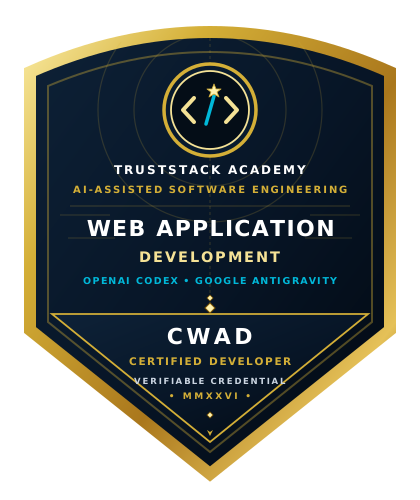
Completing the 12 modules, passing each knowledge check, and submitting your deployed capstone application with a documented GitHub repository earns you the official TrustStack Academy certificate and digital career badge.
- Credential Title: Certificate of Completion in Web Application Development (CWAD • OpenAI Codex & Google Antigravity)
- Digital Career Badge: Official CWAD Sovereign Shield digital credential for LinkedIn, resumes, and portfolio verification
- Public Verification: Authenticated on the official registry at
truststack.academy/verify - Demonstrated Artifacts: Deployed live web application + clean public GitHub repository
- 1-Click Sharing: Instant integration with LinkedIn Licenses & Certifications, GitHub, and resumes
Your certificate ID is cryptographically recorded so clients, employers, and peers can verify your completion without friction.

ACADEMYSPECIALIZED PATHWAY
WEB APPLICATION DEVELOPMENT
SAMPLE - NOT VALID
CERTIFICATE OF COMPLETIONWeb Application Development
(OpenAI Codex & Google Antigravity)
This sample recognises the achievement of
Your Name HereFor successfully fulfilling all 12 modules, practical lab deliverables, and deploying a functional web application directing
OpenAI Codex & Google Antigravity
Sample layout only - not an issued credential. QR opens this preview. "Verified" illustrates the status of an approved certificate.

CWAD Sovereign Shield Credential
Every graduate receives the official, cryptographically verifiable CWAD (Certified Web Application Developer) digital credential badge. Designed to stand out on LinkedIn profiles, GitHub repositories, and developer portfolios.
Enroll in Web Application Development for ₦100,000
Lifetime access to all 12 modules, open video lectures, AI prompt labs, capstone grading, verifiable certificate, and career guidance.
Frequently Asked Questions
Do I need prior coding or computer science experience to take this course?
No prior coding experience is required. The curriculum is intentionally designed from ground zero. We begin with how the internet and browsers operate, progress through HTML, CSS, and JavaScript fundamentals, and then teach you how to direct, explain, and review code using OpenAI Codex and Google Antigravity.
What computer hardware and internet connection do I need?
You need a desktop computer or laptop (Windows, macOS, or modern Linux) with at least 4GB of RAM and an up-to-date web browser (Google Chrome, Mozilla Firefox, or Microsoft Edge). A reliable broadband internet connection is necessary to stream video lessons and interact with the AI platforms.
What do OpenAI Codex and Google Antigravity actually do in this course?
Google Antigravity serves as your primary AI-first workspace for planning projects, scaffolding starter files, executing terminal build commands, and testing changes in real browsers. OpenAI Codex is used as an explanatory pair programmer to break down complex functions line-by-line, review code diffs, audit accessibility, and investigate errors.
Why do I still need to learn HTML, CSS, and JavaScript if AI can write code?
AI coding agents cannot build what they are not instructed to build. Without understanding HTML semantics, CSS responsive rules, and JavaScript logic, a developer cannot judge whether an agent’s output is correct, accessible, or secure. Understanding the fundamentals gives you the confidence to direct the agent, correct errors, and explain your project to clients and employers.
What will I build by the end of the course?
You will plan, build, style, test, and deploy a complete, responsive service-booking and enquiry web application. It features a semantic landing page, dynamic service catalogue, accessible contact and booking form with real-time validation, state handling, and a live deployment on a public host.
How does the self-paced format work?
The program consists of 12 structured modules totaling approximately 60 guided learning hours. You have on-demand access to all instructional study notes, masterclass video lectures with open-licensed attributions, interactive knowledge checks, prompt workbooks, and practical lab deliverables. You can study at your own pace around work or academic commitments.
What accounts and external subscriptions are required? Do I have to pay extra?
No. You do NOT need any paid subscriptions to complete this course. All coursework is engineered around 100% zero-cost free tiers: (1) Google Antigravity & AI Studio (free at https://aistudio.google.com/ using a standard Google account), (2) OpenAI Codex / free chat tier (free at https://platform.openai.com/ or https://chatgpt.com/), (3) GitHub (free developer account at https://github.com/join), and (4) Supabase for Module 10 database practice (100% Free Tier with no credit card required at https://supabase.com/pricing). We also provide zero-cloud local mock options so you never incur hosting bills.
What are the tuition and payment options?
Tuition is ₦100,000. TrustStack Academy provides an existing flexible payment option via Paystack, allowing learners to pay in full or spread tuition across two installments (with Part 1 unlocking the foundational modules and Part 2 unlocking advanced modules and certificate evaluation).
What certificate or credential do I earn upon completion?
Learners who complete all 12 modules, pass the knowledge checks, and successfully submit the capstone application evaluated against the 100-point rubric receive the official TrustStack Academy Certificate of Completion in Web Application Development with OpenAI Codex and Google Antigravity.
What career pathways does this course support?
This course prepares learners for entry-level opportunities such as Junior Web Assistant, Technical Content & Web Specialist, Freelance Web Builder for Small Businesses, QA & Accessibility Reviewer, and provides a strong foundation for full-stack software engineering programs.